Multi-repo workspaces
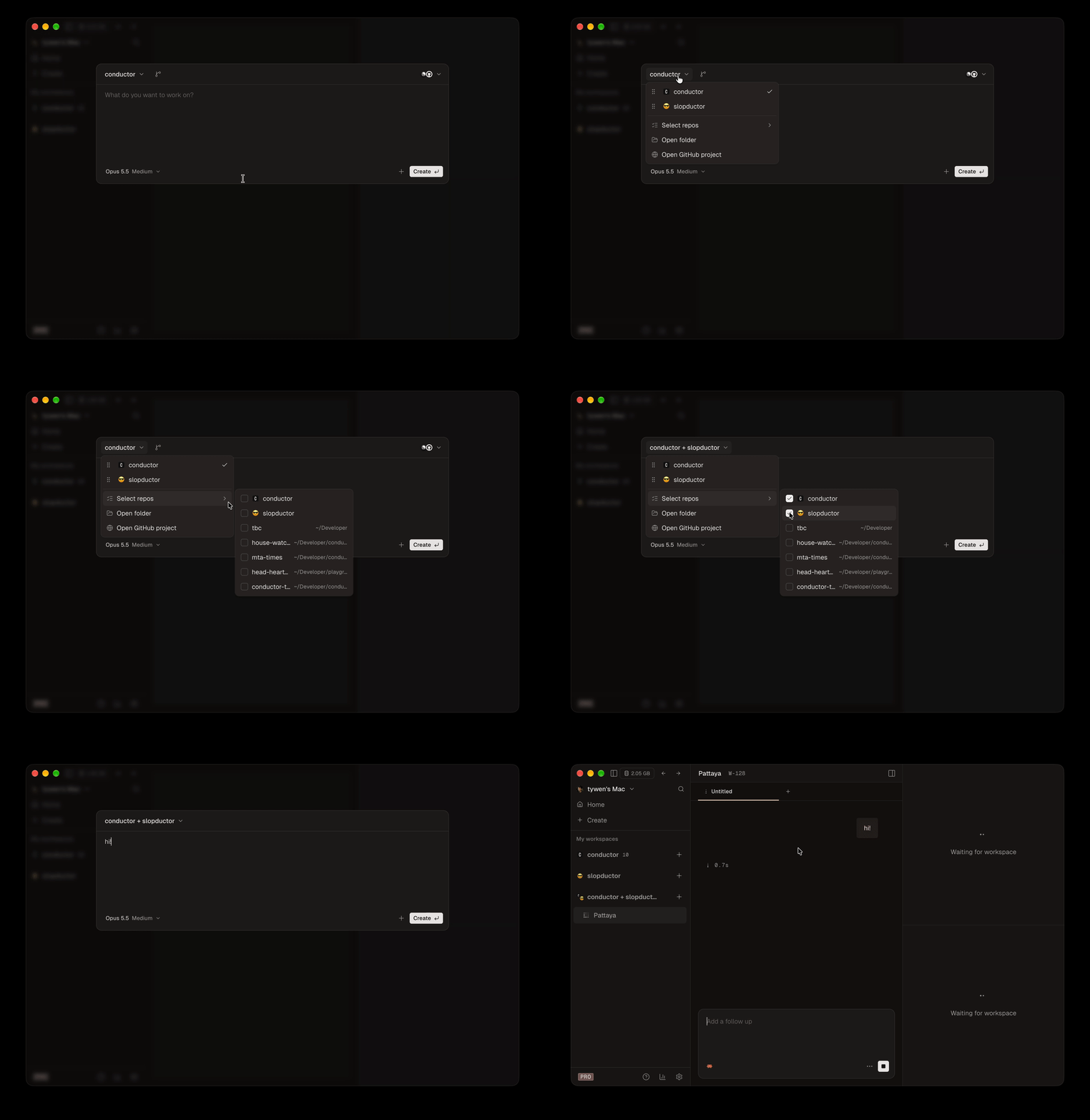
You can now work on several repositories at once from within one workspace! To get started, start a new prompt, open the projects dropdown, and select the repositories you want to work in. Or, ask an agent to do it for you.
Improvements
- Click an attached image or video to open it in a full-screen viewer. Attachments keep their real proportions and stay on one row, and the last one shows "+N" when they don't all fit.
- In an empty composer, press ↑ and ↓ to step through the messages you've sent in the chat, like in a terminal.
- Agents in local workspaces can now add folders, clone repositories and create projects for you, after checking with you first.
- The update toast shows the download percentage while an update downloads.
- In cloud workspaces, right-click a file in the Files or Changes tab to download it.
- Send feedback now includes diagnostic logs by default, and the logs are redacted before they're sent. Sending no longer waits for the logs to export.
- More of the app moves smoothly. Chats fade in instead of flashing a loading skeleton, tool calls and subagents expand and collapse, copy buttons and checks animate to a check mark, images and avatars fade in once they load, and the bars above the composer ease in. Chat search now jumps straight to each match.
Fixes
- Fixed brief freezes when switching workspaces.
- Fixed actions sometimes failing with "database is locked" while Conductor was busy.
- Fixed Conductor's tools, OpenCode chats and local MCP servers failing when an HTTP proxy was set.
- Fixed Claude's questions failing with "transport dropped mid-call" if you took more than a few minutes to answer.
- Fixed localhost links and Open buttons not opening in your default browser.
- Fixed files rewritten with identical content (for example after
pnpm install) showing as changed, and moved files showing 0 added and 0 removed lines. - Fixed some error reports being sent in the first seconds after launch with "Disable external logging" on.
- Fixed pasted images taking a moment to appear in the new workspace composer.
- Fixed the context usage panel not spanning the full composer width in cloud workspaces.
- Pressing Esc while typing on the new workspace page now takes you back right away.
- To-do lists in finished chats no longer show a pulsing icon next to the to-do that was in progress.
- Dialogs no longer turn into an empty box while they close.
- With Reduce Motion on, jumping to the bottom of a chat, to search results or to links now happens instantly, and the command palette fades without sliding.
Misc
- Search is now an icon next to the organization name at the top of the sidebar.
- Try the experimental menu bar icon, which shows your Claude and Codex usage limits and opens recent workspaces. Turn it on in Settings → Experimental.
- Updated the bundled Claude Code to 2.1.331, Codex to 0.172.0, the Cursor SDK to 1.5.0, and OpenCode to 2.2.7.
New in 0.101.1
- Fixed workspaces with a plan ready, a question or a permission request all showing the same blinking icon. Each shows its own icon again in the sidebar, on Home and in workspace tabs.