0.71.0
July 1, 2026Workspace and Chat Links
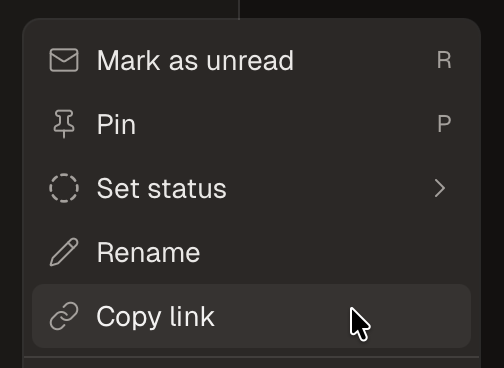
You can now right click to copy a link to a workspace or chat.
Improvements
- You can now copy a link to a workspace or chat with ⌘⇧C.
- In Settings → Git, you can now treat optional checks as blocking so the merge button only appears once every PR check passes.
- The command palette now shows each workspace name, with the branch shown as the subtitle.
- When you're making a workspace, you can now click the three dots next to the repository to change the target branch.
- You can now select OpenCode models for code reviews.
- Command palette workspace search is faster for large workspace lists.
- In Settings → Environment, you can now paste a block of
KEY=VALUElines to add several variables at once.
Fixes
- Fixed an issue where Composer 2.5 tool calls failed.
- Fixed an issue where "Install and restart" could fail on the database version warning screen.
- Fixed an issue where agents in local workspaces could stop responding.
- Fixed occasional jank when saving settings.
- Fixed typing lag in the command palette (⌘K) after repeated searches.
- Fixed cloud workspace names being overwritten with the git branch name.
- Fixed an issue where typing a new diff comment near the bottom of a long file would scroll the input out of view.
- Cmd+O now opens the local mirror of a synced cloud workspace, Cmd+Option+O opens it remotely, open-in buttons open the file you're viewing, and the remote menu copies the SSH command.
New in 0.71.1
- Fixed an issue where unrecognized models could fall back to Sonnet.